
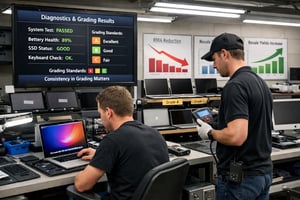
Five practical ways ITAD operators and computer refurbishers are cutting RMAs, lifting resale yields and standardizing grading across every shift.
Two technicians, the same MacBook Pro, two different grades. One marks it Grade A and routes it to retail. The next morning, a senior tech catches a battery cycle count of 720, a sticky F4 key and a webcam that refuses to focus. It comes back as Grade C — too late to stop it shipping. Two weeks later it lands back on the dock as a return, and that single device has now cost you the resale margin, the inbound logistics, the regrade time and a customer review you cannot delete.
Multiply that by the volume of computers you process every month and inconsistent grading is no longer a quality problem. It is a profit problem.
The good news: mis-grading is not inevitable. Below are five practical moves that ITADs and computer refurbishers are using to stop it bleeding profit — without slowing the line.
12hardware test categories run on every device |
500,000+PC and Mac transactions processed in 2025 |
Auto-gradeconsistent logic, every device, every shift |
Five ways to stop mis-grading costing you profit
Inconsistent grading rarely shows up as a single line on a P&L. It hides inside RMAs, inside resale price drops, inside customer disputes, inside the time senior technicians spend regrading work. The five tactics below tackle the actual mechanics that cause grades to drift between technicians, shifts and sites — each one mapped to a real operational cause.
1. Replace technician judgment with automated pass/fail
Manual grading is subjective by design. Two experienced technicians, looking at the same battery health figure or the same screen pixel anomaly, will draw different lines between Grade A, Grade B and Grade C. That is not a training failure — it is the inevitable consequence of asking humans to apply judgment under volume pressure.
The fix: use automated grading logic that runs the same hardware test against every device, applies the same thresholds, and produces a pass/fail per component. Technicians review exceptions, not every device. The same MacBook Pro now scores the same grade whether it is processed at 9am Monday or 11pm Friday.
2. Test every component, not just the obvious ones
Most mis-grading happens not on the things technicians check, but on the things they do not. A cosmetic A-grade laptop with a failed microphone, a dead Bluetooth chip or a USB-C port that no longer charges will pass a five-minute manual review and fail in the customer’s hands. Each of those failures is a return, a refund and a regrade.
The fix: run a comprehensive hardware test on every device. A complete diagnostic suite covers keyboard, trackpad, screen, RAM, storage, CPU, battery, microphone, speaker, webcam, ports, WiFi and Bluetooth — 12 test categories that catch the faults manual grading misses. Every fault becomes a known fault before the device leaves the building.
3. Catch MDM and FMI locks at intake, not at retail
An A-grade MacBook with an active Find My Mac lock or a corporate MDM enrollment is not an A-grade MacBook. It is unsellable. Most ITADs catch this only when a customer plugs it in, the device demands credentials nobody has, and the unit comes back as a return. The grade was right on paper. The reality made it worthless.
The fix: check MDM and Find My Mac status at intake, before grading. A proprietary device-check workflow that connects to Apple’s activation services turns a hidden post-sale failure into a known intake-stage decision. Locked devices route to remediation, not to resale.
4. Use smart routing, not gut-feel routing
After grading, every device needs a routing decision: sell as-is, repair, or discard. When that call sits with a technician, it is shaped by training, by tiredness, by what they remember about last week’s repair times. Sell-as-is decisions for devices that should have been repaired hit you as RMAs. Repair decisions for devices that should have been discarded hit you as wasted bench time.
The fix: let the diagnostic result drive the routing. Smart routing logic reads the test outcome and the specific component fault, then makes a consistent recommendation: sell, repair (with the part identified), or discard. The same fault gets the same decision every time — across every shift and every site.
5. Bind every grade to a verifiable certificate
When a customer disputes a grade, what you can prove matters more than what you graded. If the only record is a sticker and a technician’s initials, the dispute is unwinnable. If every grade is backed by a per-device certificate that captures make, model, serial number, OS, every test result and a timestamp, the dispute closes in your favor.
The fix: generate a Diagnostics Computer Certificate for every device, automatically, on completion of test. Centrally stored, accessible from the online dashboard, exportable as PDF, CSV, XML or JSON. Your sales team can attach it to every order. Your operations team can pull it for any RMA. Your auditor can sample any week of any month.
Why consistent grading lifts profit, not just quality
All five tactics above describe how Blackbelt360 Diagnostics Computer is built. The platform runs 12 automated hardware tests on every device, applies consistent grading logic across PC, Mac, Apple T2, Apple Silicon and Chromebook hardware, checks MDM and FMI locks at intake, drives smart routing to sell-repair-discard, and generates a per-device certificate for every result.
For an ITAD operator running computer diagnostics software across mixed PC and Mac volume, the commercial effect compounds. Lower RMAs. Higher resale yields. Faster speed to market. Fewer senior-technician hours spent regrading. And a defensible audit trail when a customer or a regulator asks.
This is why refurbisher software buyers comparing platforms increasingly screen for two things: how the software handles Apple T2 and Apple Silicon Macs (because Mac volume is growing in every ITAD pipeline), and how it generates a verifiable per-device record (because customer disputes only go one way without one).
What Diagnostics Computer covers
The platform is built for the high-volume, mixed-hardware reality of computer refurbishment — the same place enterprise tools target, with the same depth of test.
Hardware tests run on every device
- Keyboard — confirms each key’s functionality and responsiveness
- Trackpad — evaluates sensitivity and accuracy
- Display — analyzes screen quality, resolution and color accuracy
- Webcam — verifies clarity and operational status
- Ports — confirms all USB, HDMI and other ports are working
- CPU — assesses processor speed and efficiency
- Memory — evaluates RAM capacity and performance
- Storage — checks read/write speeds and drive health
- Microphone and speaker — tests audio input and output
- WiFi — verifies stability and connection strength
- Bluetooth — confirms pairing and operational status
- Battery — tests recharge cycles and recycle counts
Hardware breadth
- Intel-based and Apple Silicon Macs — including Apple T2 and Secure Boot devices
- Windows desktops, laptops and servers — BIOS and UEFI
- Chromebook diagnostics with full data capture
- Linux-based systems
- Industry-standard APIs and Webhooks for connection into your ERP, WMS and asset management platform
- Customizable diagnostic reports in PDF, CSV, XML and JSON for audit
- Centralized online dashboard for user management, license distribution and certificate storage
- Per-device Diagnostics Computer Certificate generated automatically on every test completion
- Smart routing recommendations — sell as-is, repair (with component identified), or discard
Integration and audit trail
- Industry-standard APIs and Webhooks for connection into your ERP, WMS and asset management platform
- Customizable diagnostic reports in PDF, CSV, XML and JSON for audit
- Centralized online dashboard for user management, license distribution and certificate storage
- Per-device Diagnostics Computer Certificate generated automatically on every test completion
- Smart routing recommendations — sell as-is, repair (with component identified), or discard
Audit your current grading process
Before you commit to changing anything, work through this short checklist against your current operation. The answers will tell you where mis-grading is leaking profit today.
- If two technicians grade the same device, do they consistently produce the same grade?
- How many hardware components do we test on every device, and how many do we test only when something looks wrong?
- At what stage do we first check for MDM enrollment and Find My Mac activation lock?
- What percentage of our RMAs trace back to a fault that could have been caught at intake?
- When a customer disputes a grade, what evidence can we produce in under five minutes?
- How much senior-technician time does regrading consume each week?
- Are sell-repair-discard decisions made consistently, or does the call vary by technician and shift?
If any of those answers reveals more guesswork than evidence, mis-grading is costing you more than you think — and almost all of it is recoverable.
Frequently asked questions
How does Blackbelt360 Diagnostics Computer handle Apple T2 and Apple Silicon Macs?
Diagnostics Computer supports the full range of Intel-based and Apple Silicon-based Macs, including devices with Apple T2 security chips and Secure Boot. The platform runs the same 12-category hardware test suite across every Mac generation, applies the same grading logic, and generates the same per-device certificate — so a 2018 MacBook Pro and a 2024 MacBook Air follow identical workflows on your line.
Can the platform check MDM and Find My Mac activation locks at intake?
Yes. The proprietary device-check workflow connects to global databases including Apple’s activation services to verify Find My Mac status and any active MDM enrollment before a device is graded. Locked devices route to remediation rather than to retail.
How does automated grading reduce RMAs?
Most RMAs in computer refurbishment trace back to two causes: a fault that was not tested at intake, and a fault that was tested but graded inconsistently. Running 12 automated hardware tests on every device closes the first gap. Applying the same grading logic to every test result closes the second gap. Together they remove the most common reasons devices come back.
Can we use Diagnostics Computer alongside our existing ITAD software?
Yes. Diagnostics Computer is built to integrate, not to replace. Industry-standard APIs and Webhooks allow it to push test results, grades and certificates into your existing ERP, WMS or asset management platform. Most deployments run alongside whatever your warehouse, finance and dispatch teams already use.
See Diagnostics Computer on your own hardware
A 30-minute demo with the Blackbelt360 team will show you the test suite, the auto-grading logic, the smart routing output and the certificate generation — on a real device comparable to the ones on your line. We will also walk through how the data flows into your existing systems.
Book a demo → blackbelt360.com